
Wise PelicanKnowledge BaseLogin
HomeDesigning 101InDesign Template Upload

Categories

  • PowerDesigner
  • PowerFarm
  • Everything Mailing
  • Mailing Lists
  • Designing 101
  • Facebook Audiences
  • Everything Else
  • All Articles

Articles

  • Custom Design Template FAQ
  • Do you offer full bleed designs?
  • How do I add another text box or an image?
  • I'm having trouble uploading my image
  • InDesign Template Upload
  • Using Canva (or other software) to Create a Design In Wise Pelican
  • Why can’t I use an image from my website and apply it to a postcard.
  • Why is my image being cut off at the top and bottom?
Designing 101

InDesign Template Upload

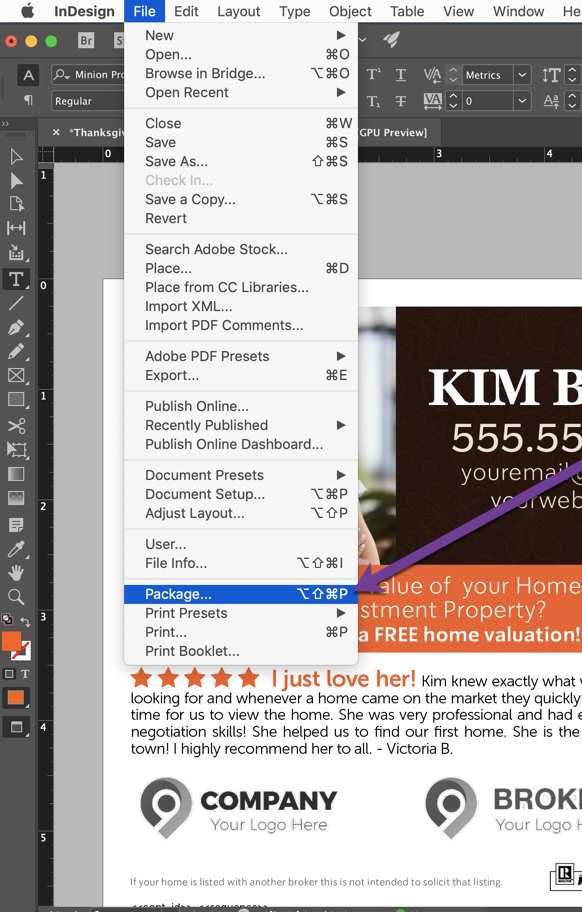
If you would like to have us upload an existing InDesign file as a template onto your account please send us the full "Package" design file. This will allow our designers to properly upload your design as a template onto our platform.  
Postcard marketing guides

Deeper reading on wisepelican.com

  • What postcard sizes should I use?
  • Tips for Just Sold postcards
  • Tips for Just Listed postcards

Related articles

  • What is PowerDesigner by Wise Pelican?
  • Using Canva (or other software) to Create a Design In Wise Pelican
  • Creating a Mailing From Start To Finish
  • Do you offer full bleed designs?
  • How does the system work?
  • Custom Design Template FAQ
Wise Pelican

© 2026 Wise Pelican. All rights reserved.

ContactLogin

Postcard guides

  • What are the best real estate postcard companies?
  • How much do real estate postcards cost?
  • What postcard sizes should I use?
  • USPS EDDM versus Wise Pelican
  • What ROI should I expect from real estate postcards?
  • What are real estate postcard response rates?
  • What farm size and mailing frequency should I use?
  • How do I choose a real estate postcard company?